
Find Duplicate Fields in a Table
-
Posted on June 6, 2010 by Derek Dieter
-
2
A common scenario when querying tables is the need to find duplicate fields within the same table. To do this is simple, it requires utilizing the GROUP BY clause and counting the number of recurrences. For example, lets take a customers table. Within the customers table, we want to find all the records where the customers FirstNames are the same. We also want to find which FirstNames are the same and count them.
First off, let’s get a count of how many customers share the same first name:
[cc lang=”sql”]
SELECT FirstName
,DuplicateCount = COUNT(1)
FROM SalesLT.Customer
GROUP BY FirstName
HAVING COUNT(1) > 1 — more than one value
ORDER BY COUNT(1) DESC — sort by most duplicates
[/cc]
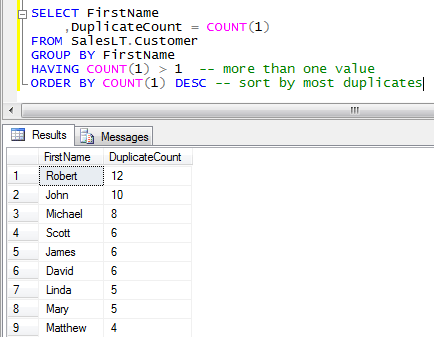
Duplicate FirstNames in Customers Table
So here we see the results of the query sorted by the names which are duplicated the most. Using the having clause restricts the result set to only those customers that have duplicates. The order by clause orders the results by those who are duplicated the most.
This method can also be expanded to include multiple columns, like FirstName and LastName. In order to expand the criteria, we simply add the columns to the select list and the group by clause.
[cc lang=”sql”]
SELECT FirstName
,LastName
,DuplicateCount = COUNT(1)
FROM SalesLT.Customer
GROUP BY
FirstName
,LastName
HAVING COUNT(1) > 1 — more than one value
ORDER BY COUNT(1) DESC — sort by most duplicates
[/cc]
Ok, so now that we have found the duplicate items, how do we join that back on the main table so we can see the entire record? There are two methods that may perform differently depending on your result set so in this case I will include them both. Only the EXISTS method however can be used for multiple columns.
[cc lang=”sql”]
— *********************************
— * Find duplicates using IN
— *********************************
SELECT *
FROM SalesLT.Customer
WHERE FirstName IN
(
SELECT FirstName
FROM SalesLT.Customer
GROUP BY
FirstName
HAVING COUNT(1) > 1 — more than one value
)
ORDER BY FirstName
— *********************************
— * Find duplicates using EXISTS
— *********************************
SELECT *
FROM SalesLT.Customer c1
WHERE EXISTS
(
SELECT 1
FROM SalesLT.Customer
WHERE FirstName = c1.FirstName
GROUP BY
FirstName
HAVING COUNT(1) > 1 — more than one value
)
ORDER BY FirstName
[/cc]
Now what if you want to check to see if there are duplicates for an entire row without having to do a group by you ask? In other words, how do I find the records where the entire row is a duplicate. Yes, there is a way. To do this, we utilize a very handy function named CHECKSUM. Checksum returns a numerical value representing a single “hash” which is unique (mostly) for a multitude of values. The advantage of this method over the group by is that it is much faster.
[cc lang=”sql”]
SELECT *
FROM (
SELECT
CustomerID
,ChkSum =
CHECKSUM
(
FirstName,
LastName
— specify the rest of the columns
)
FROM SalesLT.Customer sc
) t1
JOIN
(
SELECT
CustomerID
,ChkSum =
CHECKSUM
(
FirstName,
LastName
— specify the rest of the columns
)
FROM SalesLT.Customer
) t2
ON t1.CustomerID != t2.CustomerID
AND t1.ChkSum = t2.ChkSum
[/cc]
- Comments (RSS)
- Trackback
- Permalink

Really helpfull, saved my day

Very well, thanks!

Very helpful! Thank you for taking the time to post this.

This is a really concise post about finding duplicate records, especially with reference to joining the query back to the main table. Elegant! The post is well formated, and easy to read and understand. Thanks!

This post was extremely helpful. Thanks!

Find Duplicate Fields in a Table. please make proper title like “Find Duplicate Fields value in a Table.

