
Rename Column
-
Posted on July 15, 2009 by Derek Dieter
-
1
In order to rename a column name, you must use sp_rename. The syntax of sp_rename is the following:
exec sp_rename ‘tablename.ColumnName’, ‘NewColumnName’, ‘column’ –objecttype
Here is an example:
[cc lang=”sql”]
CREATE TABLE Employee
(
ID int,
FName varchar(50)
)
GO
EXEC sp_rename ‘Employees.FName’, ‘FirstName’, ‘column’
[/cc]
After executing the script above, you will receive the following informational message:
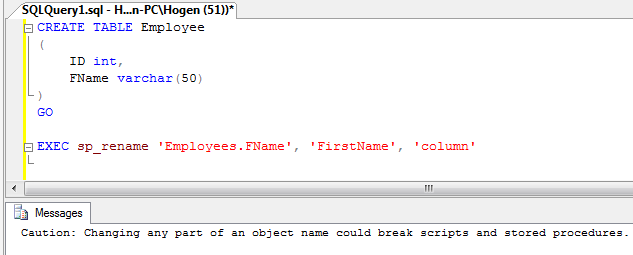
This comes up as a reminder that the rename you just performed may have a negative effect on any stored procedures referencing the column. Make sure to check to see if any stored procedures are referencing the column prior to renaming it.
If the column has a constraint, you must drop the constraint prior to renaming the column. Otherwise you will get the following error message:
[code]
Msg 15336, Level 16, State 1, Procedure sp_rename, Line 444
Object ‘Orders.OrderAmount’ cannot be renamed because the object participates in enforced dependencies.
[/code]
To drop the constraint, use the following example:
[cc lang=”sql”]
ALTER TABLE Employee
DROP CONSTRAINT pk_employee
[/cc]
- Comments (RSS)
- Trackback
- Permalink

Hello,
Is there a query to rename a column in SQL Server 2008 rather than using a stored procedure ? I have been using the following alter queries but those does not work for me.
Alter table tblPerson alter column Gender GenderId int
Alter table tblPerson alter column Gender set GenderId
Please help…..

I have been able to rename columns regardless of their membership in primary or foreign keys without issue. However, I received the message “cannot be renamed because the object participates in enforced dependencies” for a column that had a check constraint.

hai
is there any other process to change the name of the column by using alter or update i know the process of sp_rename i want to know the code using alter and update

Hi Kashyap,
With SQL Server, the only way to change the column name is to use sp_rename. This can be verified by doing a trace when changing a column name using SSMS.
Derek

how to rename a table in sql?
Hi, you have to use sp_rename:
EXEC sp_rename ‘dbo.OldTableName’, ‘NewTableName’
Realize however that any object that reference this table will no longer work. (i.e. stored procedures, views).

without “using sp_rename” can’t we change the column name ? only using a query, not in database explorer and right click on column name and renaming it.

