
How to Create a Type2 SCD (Slowly Changing Dimension)
-
Posted on November 14, 2011 by Derek Dieter
-
3
This article could just as well be called creating a historical snapshot table. This type of table is also referenced as a dimension depending on what kind of data repository it’s located in. Personally, I prefer to keep a historical snapshot table in a normalized data store that contains history. This normalized data store is typically the first stopping point from the source system. It is useful because it keeps historical snapshots of what the data looked like in the source system at any point in time.
To get started, let’s create a history table we will use to store the historical values.
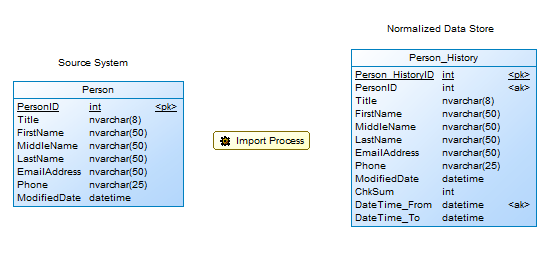
History Table for Person
From above, we see that we have 4 additional columns:
- Person_HistoryID – this is a surrogate key specific to our new table.
- ChkSum – contains a CHECKSUM of all the columns used compare data discrepencies.
- DateTime_From – the beginning date in which this record is effective.
- DateTime_To – the ending date in which this record is no longer effective.
First, let’s create our sample source table and populate it with some data
[cc lang=”sql”]
CREATE TABLE Person(
PersonID int IDENTITY(1,1) NOT NULL,
Title nvarchar(8) NULL,
FirstName nvarchar(50) NOT NULL,
MiddleName nvarchar(50) NULL,
LastName nvarchar(50) NOT NULL,
EmailAddress nvarchar(50) NULL,
Phone nvarchar(25) NULL,
ModifiedDate datetime NOT NULL
)
SET IDENTITY_INSERT [dbo].[Person] ON
INSERT [dbo].[Person] ([PersonID], [Title], [FirstName], [MiddleName], [LastName], [EmailAddress], [Phone], [ModifiedDate])
VALUES (1, N’Mr.’, N’Gustavo’, NULL, N’Achong’, N’[email protected]’, N’398-555-0132′, CAST(0x000096560110E30E AS DateTime))
INSERT [dbo].[Person] ([PersonID], [Title], [FirstName], [MiddleName], [LastName], [EmailAddress], [Phone], [ModifiedDate])
VALUES (2, N’Ms.’, N’Catherine’, N’R.’, N’Abel’, N’[email protected]’, N’747-555-0171′, CAST(0x000096560110E313 AS DateTime))
INSERT [dbo].[Person] ([PersonID], [Title], [FirstName], [MiddleName], [LastName], [EmailAddress], [Phone], [ModifiedDate])
VALUES (3, N’Ms.’, N’Kim’, NULL, N’Abercrombie’, N’[email protected]’, N’334-555-0137′, CAST(0x000096560110E313 AS DateTime))
SET IDENTITY_INSERT [dbo].[Person] OFF
[/cc]
Next, let’s create our history table:
[cc lang=”sql”]
CREATE TABLE Person_History (
Person_HistoryID int IDENTITY(1,1) NOT NULL,
PersonID int NOT NULL,
Title nvarchar(8) NULL,
FirstName nvarchar(50) NOT NULL,
MiddleName nvarchar(50) NULL,
LastName nvarchar(50) NOT NULL,
EmailAddress nvarchar(50) NULL,
Phone nvarchar(25) NULL,
ModifiedDate datetime NULL,
ChkSum int NULL,
DateTime_From datetime NULL,
DateTime_To datetime NULL,
CONSTRAINT PK_Contact_ContactID PRIMARY KEY NONCLUSTERED (Person_HistoryID)
ON “PRIMARY”,
CONSTRAINT AK_UC_PERSONID_DATETI_PERSON_H UNIQUE CLUSTERED (PersonID, DateTime_From)
)
[/cc]
Now that we have our tables created, let’s look at the script that will import the data and close out the old records. In the first step, we look for Person records that have changed. We do this by comparing the checksum of the active record stored in the history table with a checksum we dynamically calculate off of the source records. If the checksums do not match, then we close out the currently active record, making it inactive. We then insert a new record containing the new values and make it active.
[cc lang=”sql”]
DECLARE @PersonID_Updated table (PersonID int);
DECLARE @DateTime_Inserted datetime;
DECLARE @DateTime_Future datetime;
SET @DateTime_Inserted = GETDATE();
SET @DateTime_Future = ‘2079-06-06’;
/************************************
* close old record if it exists
* and a value has been changed
*************************************/
UPDATE ph
SET DateTime_to = @DateTime_Inserted
OUTPUT inserted.PersonID
INTO @PersonID_Updated
FROM Person_History ph
JOIN Person p
ON ph.PersonID = p.PersonID
AND
ph.chksum !=
CHECKSUM
(
p.Title
,p.FirstName
,p.MiddleName
,p.LastName
,p.EmailAddress
,p.Phone
,p.ModifiedDate
)
AND DateTime_to = @DateTime_Future
/************************************
* insert any new or closed
* out records
*************************************/
INSERT INTO Person_History
(
PersonID
,Title
,FirstName
,MiddleName
,LastName
,EmailAddress
,Phone
,ModifiedDate
,ChkSum
,DateTime_From
,DateTime_To
)
SELECT
PersonID
,Title
,FirstName
,MiddleName
,LastName
,EmailAddress
,Phone
,ModifiedDate
,ChkSum =
CHECKSUM
(
p.Title
,p.FirstName
,p.MiddleName
,p.LastName
,p.EmailAddress
,p.Phone
,p.ModifiedDate
)
,DateTime_From = @DateTime_Inserted
,DateTime_To = @DateTime_Future
FROM Person p
WHERE
NOT EXISTS
(
SELECT 1
FROM Person_History
WHERE PersonID = p.PersonID
)
OR
EXISTS
(
SELECT 1
FROM @PersonID_Updated
WHERE PersonID = p.PersonID
)
[/cc]
- Comments (RSS)
- Trackback
- Permalink

How to select date form table and insert it in anther table

