
SQL Server Begin Try
-
Posted on June 12, 2010 by Derek Dieter
-
2
The try catch methodology of programming is a great innovation for SQL 2005+. The first question you should ask yourself before using Try/Catch should be “why?”. Why am I going to use Try/Catch?
Personally, I have found a few uses, however I must say I do fall into the category of not being a developer that uses this for every procedure. Generally speaking, I do want my errors to bubble up to the next highest layer (like the web layer, and display exactly as they occur). And while you can use try/catch and still allow errors to bubble up, in a lot of cases I don’t see the need. In fact, in implementing Try/Catch in an improper way, it is possible to accidently hide errors to the extent of no one ever knowing about them.
That said, probably the best use of Try/Catch is to implement your own error logging within your database.
Before we get into an extensive logging example, let’s see an example of a Try Catch block. The following example would be a good use of Try/Catch because it is plausible that a negative number may enter a variable used in the Top Clause:
[cc lang=”sql”]
DECLARE @TopRows int
SET @TopRows = -1
BEGIN TRY
SELECT top (@TopRows) *
FROM SalesLT.Customer
END TRY
BEGIN CATCH
SELECT ERROR_NUMBER(), ERROR_MESSAGE()
END CATCH
[/cc]
When we execute this script, we see that no exceptions are returned. Instead, a second result set is shown. Notice the first result set is also shown (returning no rows). I have not found a way around this, the column meta data will always be returned.
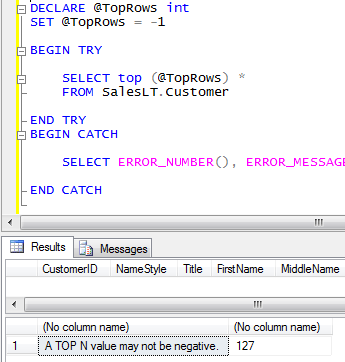
Error is Caught
Now that we’ve seen a simple example of Try/Catch, let’s look at a more extensive example. The following logging example was based off an example in the book, “Pro SQL Server 2005
Database Design and Optimization” by Louis Davidson. Hats off for a great book.
First, let’s look at an example of a complete Try / Catch implementation, first we need to create our supporting objects.
[cc lang=”sql”]
— Create our custom Schema for Logging
CREATE SCHEMA [Log] Authorization DBO
GO
— Create our error log table
CREATE TABLE Log.ErrorLog
(
[Error_Number] int NOT NULL,
[Error_Location] sysname NOT NULL,
[Error_Message] varchar(max),
[SPID] int,
[Program_Name] varchar(255),
[Client_Address] varchar(255),
[Authentication] varchar(50),
[Error_User_Application] varchar(100),
[Error_Date] datetime NULL
CONSTRAINT dfltErrorLog_error_date DEFAULT (GETDATE()),
[Error_User_System] sysname NOT NULL
CONSTRAINT dfltErrorLog_error_user_system DEFAULT (SUSER_SNAME())
)
GO
[/cc]
Now we create our stored procedure which inserts the error found:
[cc lang=”sql”]
USE [AdventureWorksLT2008]
GO
CREATE PROCEDURE [Log].[ErrorLog_Ins_Error_Dtl]
(
@Error_Number int = NULL,
@Error_Location sysname = NULL,
@Error_Message varchar(4000) = NULL,
@UserID int = NULL
)
AS
BEGIN
BEGIN TRY
INSERT INTO Log.ErrorLog
(
[Error_Number]
,[Error_Location]
,[Error_Message]
,[SPID]
,[Program_Name]
,[Client_Address]
,[Authentication]
,[Error_User_System]
,[Error_User_Application]
)
SELECT
[Error_Number] = ISNULL(@Error_Number,ERROR_NUMBER())
,[Error_Location] = ISNULL(@Error_Location,ERROR_MESSAGE())
,[Error_Message] = ISNULL(@Error_Message,ERROR_MESSAGE())
,[SPID] = @@SPID
,[Program_Name] = ses.program_name
,[Client_Address] = con.client_net_address
,[Authentication] = con.auth_scheme
,[Error_User_System] = SUSER_SNAME()
,[Error_User_Application] = @UserID
FROM sys.dm_exec_sessions ses
LEFT JOIN sys.dm_exec_connections con
ON con.session_id = ses.session_id
WHERE ses.session_id = @@SPID
END TRY
BEGIN CATCH
— We even failed at the log entry so let’s get basic
INSERT INTO Log.ErrorLog
(
ERROR_NUMBER
,ERROR_LOCATION
,ERROR_MESSAGE
)
VALUES
(
-100
,OBJECT_NAME(@@PROCID)
,’Error Log Procedure Errored out’
)
END CATCH
END
GO
[/cc]
Finally, let’s look at an example of how we implement our error trapping system.
[cc lang=”sql”]
DECLARE @TopRows int
SET @TopRows = -1
BEGIN TRY
SELECT top (@TopRows) *
FROM SalesLT.Customer
END TRY
BEGIN CATCH
EXEC [Log].[ErrorLog_Ins_Error_Dtl]
—
END CATCH
[/cc]
From the example above, we see that the only action we take after an error has been caught, is to execute our error logging procedure (which then inserts into a table). This method may or may not be ok depending on your application. In most cases I have found that you do want the front end to know about the error. So in order to facilitate that, you can simple use the RAISERROR function after executing the error log procedure.
- Comments (RSS)
- Trackback
- Permalink

How exactly shall i use raiserror ? The code below doesnt work
BEGIN TRY
if exists(select * from temp where ch_x=2)
print ‘testing’
END TRY
BEGIN CATCH
EXEC [ErrorLog_Ins_Error_Dtl]
raiserror(‘2 is not a valid number’, 16,1)
—
END CATCH

EXCEL IMPORT TO SQL
Hi,
I am new to SQL server, and have been struggling with data importation from excel to SQL. I have a 32 bit computer. The code I have used for this import is;
Create table Test
GO
INSERT INTO Test
SELECT * FROM OPENROWSET(‘Microsoft.Jet.OLEDB.4.0’,
‘Excel 12.0;HDR=YES;Database=H:adhoctest.xlsx;’,
‘SELECT * FROM [Test$]’)
GO
However, it returned the error below;
OLE DB provider “Microsoft.Jet.OLEDB.4.0” for linked server “(null)” returned message “Could not find installable ISAM.”.
I will appreciate your help
Amos

just remove the in that above line “HDR=YES”

