
SQL Server Select
-
Posted on February 12, 2010 by Derek Dieter
-
0
The SQL Server Select statement is the first statement used when returning data. It is the most used and most important statement in the T-SQL language. The Select statement has many different clauses. We will step through each clause further in the tutorial, however now, we will look at Select itself.
The following
[cc lang=”sql”]
SELECT ‘Mike’ AS FirstName
[/cc]
As we can see from our results, the code returns one row, one column. The data of the column returned is the value: ‘Mike’. The column’s name is ‘FirstName’.
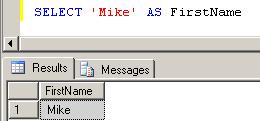
The ‘AS’ allows you to specify a column alias. This alias could be anything, in this case we made it ‘FirstName’. We can also Select multiple columns of data by separating the columns using a comma:
[cc lang=”sql”]
SELECT ‘Mike’ AS FirstName, ‘Nichols’ AS LastName
[/cc]

Returning two columns
These examples so far, have only used the Select statement by itself. Now we will explore using Select in addition with the ‘From’ clause. The From Clause allows a source to be specified for the Select Statement. For the purposes of this example, the source is always a table. Let’s look at an example.
[cc lang=”sql”]
SELECT *
FROM Person.Person
[/cc]
Phonetically the above query is pronounced: Select star from Person dot Person. The star (*) or asterisks is notation for saying “all columns”. Basically, the query is saying give me all columns from the Person table contained within the Person Schema. The person schema is basically a class, or a way to better organize tables. This example will return every column for every row of the Person.Person table. We could also specify specific columns in order to limit the results:
[cc lang=”sql”]
SELECT
FirstName,
MiddleName,
LastName
FROM Person.Person
[/cc]
This query would return all rows for the three columns listed. Now suppose we did not want to return all the columns listed. Instead, we only want to return people with the last name of ‘Adams’. This is where the ‘From’ clause comes in.
[cc lang=”sql”]
SELECT
FirstName,
MiddleName,
LastName
FROM Person.Person
WHERE LastName = ‘Adams’
[/cc]
The where clause is followed by the column name we want to filter. The equal sign separates the value we want the column to be equal to. And we place ‘Adams’ within single quotes because it is a string value (or not strictly numeric). This now returns only people that have the last name of Adams.
The Where clause is where the power of SQL begins to get introduced. We can also provide more specifics regarding the rows we want to return by adding additional criteria in the where clause. We do this by specifying the AND statement.
[cc lang=”sql”]
SELECT
FirstName,
MiddleName,
LastName
FROM Person.Person
WHERE LastName = ‘Adams’ AND FirstName = ‘John’
[/cc]
This query now only returns the rows where the FirstName is ‘John’ and LastName is ‘Adams’. Suppose we wanted either people with the last name of ‘Adams’ OR people with the last name of ‘Smith’. In order to return either of these names, we use the OR statement.
[cc lang=”sql”]
SELECT
FirstName,
MiddleName,
LastName
FROM Person.Person
WHERE LastName = ‘Adams’ OR LastName = ‘Smith’
[/cc]
- Comments (RSS)
- Trackback
- Permalink

are my new heros. Too bad they’re not coming to Seattle (or the Northwest at all!) any time soon. I would love to see a live show of tihres.

Technically this is a correct explanation, but it’s without context or meaningful example.
Who selects FirstName and MiddleName and LastName when you know the first and the last name? And who has a table named Person in a schema named person?
I mean- it’s all correct, but would be more valuable to have a real world example of a real world table… It’s a bit too abstracted and generic.

are my new heros. Too bad they’re not coming to Seattle (or the Northwest at all!) any time soon. I would love to see a live show of threis.

