
Local Linked Server
-
Posted on June 18, 2009 by Derek Dieter
-
1
When using OPENQUERY you will sometimes want to make calls to the same server you are working from. The most common reason for this is to query the output of a stored procedure into a temporary table.
For that example, follow this link: (Insert Results of Stored Procedure Into Table)
Before doing that you will have to create a linked server. You can either create the server programatically:
[cc lang=”sql”]
EXEC sp_addlinkedserver
@server=’LOCALSERVER’,
@srvproduct=’SQLSERVER’,
@provider=’SQLNCLI’,
@datasrc=’SERVERNAMEINSTANCENAME’
[/cc]
Or you can create the linked server manually:
- In SSMS, Expand Server Objects -> Linked Servers -> (Right click on the Linked Server Folder and select “New Linked Server”)
- The “New Linked Server” Dialog appears.
- Type in a friendly name that describes your local server (without spaces). I use LOCALSERVER.
- Provider – Select “Microsoft OLE DB Provider for SQL Server”
- Product Name – type: SQLSERVER (with no spaces)
- Datasource – type the SERVERNAMEINSTANCENAME
- ProviderString – Blank
- Catalog – Optional (If entered use the default database you will be using)
- Within the same Dialog on the left menu under “Select a Page”, select Security
- Select the radio button named “Be made using the login’s current security context”
- Click OK, and the new linked server is created
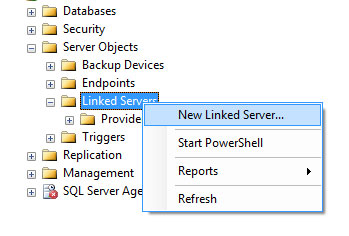
Add New Linked Server
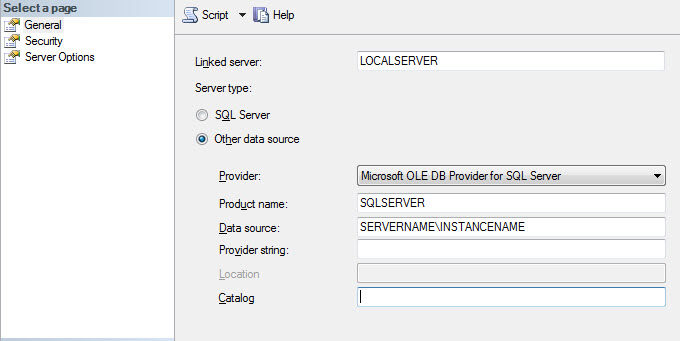
Linked Server Settings
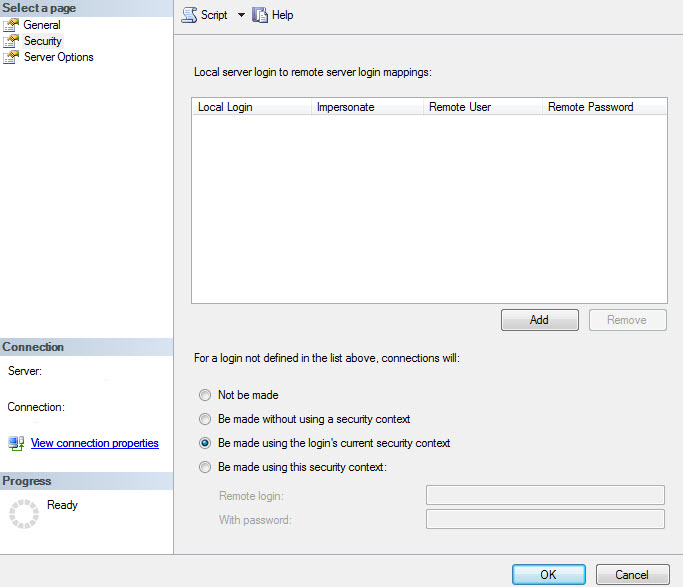
Linked Server Security Settings
- Comments (RSS)
- Trackback
- Permalink

i just started my sql dba job am new one in this field.
1-I hv configuere Linked server,bt i dont know how it is used?
I hv added Link server throgh SSMS.As shown above.
How i can utilised it.
2-I hv db in datacentre room,so that i hv give 2 cilent conncetion to my near room.aleardy there r 2 m/c’s with OS Win7.
My db server installed on SQl server 2008 stnd R2 edition.
wat is requirement for cilent M/c’s.pls suggest me.

Thank you it helped me.

