
Introduction to Change Data Capture (CDC)
-
Posted on November 1, 2010 by Derek Dieter
-
2
Change Data Capture (CDC) is a powerful feature included in SQL Server 2008. Using change data capture, it is possible to determine which values have been added, changed, or deleted within a table. Setting up CDC is done by specifying tables to monitor.
Under the hood, CDC is written using the same repl logreader function that transactional replication uses. Don’t worry too much though. If you are like me, then when you hear the word replication, you start running for the hills. Well, CDC is not as much maintenance. The biggest thing you have to worry about with CDC, is that the disk that contains the log never gets full. When that does happen, and it should be rarely, then yes it is a pain. What you have to do in that case is flip the do not truncate bit for the log file to ‘no’. That aside, let’s get started.
First thing you want to do is enable change data capture. This is done at the database level.
[cc lang=”sql”]
USE AdventureWorks
GO
DECLARE @ReturnCode int
EXEC @ReturnCode = sys.sp_cdc_enable_db
SELECT @ReturnCode
SELECT
name
,is_cdc_enabled
FROM sys.databases
[/cc]
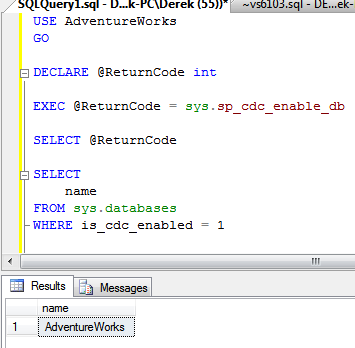
Value Returned from Enabling CDC
Even though we performed the above action, nothing will happen until we define the tables and columns that it should monitor. When defining a table to monitor, there are a few parameters that need to be passed:
| CDC Parameters | |
|---|---|
| Parameter | Description |
| @source_schema | The schema name of the table to monitor (ex: dbo) |
| @source_name | The name of the table to monitor |
| @role_name | A database or server role which is used to grant access to the data. If the specified role does not exist, it will be created. Note: DB Owner role can always access the data |
| @supports_net_changes | When enabled you are able to retrieve all changed values within a single row for a given time period (using LSN’s – Log Sequence Numbers). Otherwise, multiple rows are returned. |
| @captured_column_list | List of columns to capture. Must either include primary key, or specify a unique index using the @index_name parameter |
| @filegroup_name | Name of the filegroup to store the Change Data on |
Let’s enable a table to run CDC:
[cc lang=”sql”]
EXEC sys.sp_cdc_enable_table
@source_schema = ‘Sales’ –mandatory
, @source_name = ‘Customer’ –mandatory
, @role_name = ‘cdc_manager’ –mandatory
, @supports_net_changes = 0
, @captured_column_list = ‘CustomerID,CustomerType,TerritoryID’
, @filegroup_name = N’PRIMARY’;
[/cc]
Once we run the above sample, we’ll notice there are two new jobs running under the SQL Server Agent.
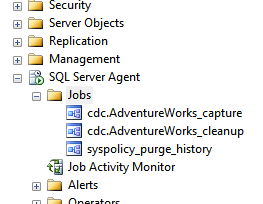
CDC Jobs Created
The first job, cdc.AdventureWorks_capture, is not much different than a replication job. Basically this job runs the repl log reader by executing it in an infinite loop. The next job, is the cleanup job which prunes the data by only retaining two days of data. (This is configurable however).
Now that we’ve enable CDC for the Sales.Customer table, let’s update some records to see how CDC works.
[cc lang=”sql”]
— Update some records
UPDATE TOP (1) Sales.Customer
SET CustomerType = ‘S’
WHERE CustomerType != ‘S’
— Query the capture table
SELECT *
FROM cdc.Sales_Customer_CT
[/cc]

Output from the CDC Capture Table
From the capture table output, we see two records. One record represents the original value (update mask = 3), while the second record represents the new changed value (update mask = 4).
Here are the update mask values:
- 1 = delete
- 2 = insert
- 3 = update (old values)
- 4 = update (new values)
In our next article we will go into depth in querying CDC and the internals.
- Comments (RSS)
- Trackback
- Permalink

I’ve been worried about this, too. I heard that it was the worst in Texas (21 detahs and 586 cases), and that Dallas at least has been spraying from the air. In my neighborhood, they usually are great about having those spraying trucks come out nightly, but this summer – when we need them the most – they’re not around here at all. I really worry about my animals, even though we’re diligent about giving them flea meds that also help with the mosquitoes but from what I’ve read West Nile doesn’t affect dogs the way it does humans, so that’s good news.Kristin

You have an informative article regarding CDC in SQL Server 2008 that is obscured by a blatant patch of advertising, making the article unreadable. Why,why,why? I realise you have to make money somehow but this has just p***** me off so much I won’t be coming back. Be subtle people, you’ll probably make more money that way.

Thank you for the feedback David. I moved things around to make it more readable. Thanks again for the constructive criticism.
Derek

You guys get more and more hilarious. Now I have to start panyig 10 cents per hour just to be eligible to play around with GAE SQL. That’s not how you attract prospective customers.Really, I’d like to use your services, and I’m investing time to get things running on your proprietary Java Servlet platform. I signed up for GAE SQL, got it, but didn’t have the time yet to try it out, because of aforementioned required work-arounds.I better invest time looking for another platform that allows me a standards-based development which is free of charge as long as I’m playing around.

