
Extracting Data from a Source System to History Tables
-
Posted on April 8, 2010 by Derek Dieter
-
2
This is a topic I haven’t found much information written about, however nearly every system I’ve worked with needs this exact functionality. It is important that the method for extracting data be done in a way that does not hinder performance of the source system. In this example, the goal is to extract data from a source system, into another database (or server) all while requiring as little resources as possible. This is why I choose to pull from a source system in two separate stages.
First Stage – Staging Import
The first step is to do a very simple select statement into a staging table. This first select statement may do some ETL — mostly in regards to lookups that are needed from the source system. There could be multiple select statements pulling data into multiple staging tables. I prefer to pull tables from the source to staging in a one to one relationship. So for every table we need, we also have a corresponding staging table. See the diagram below:
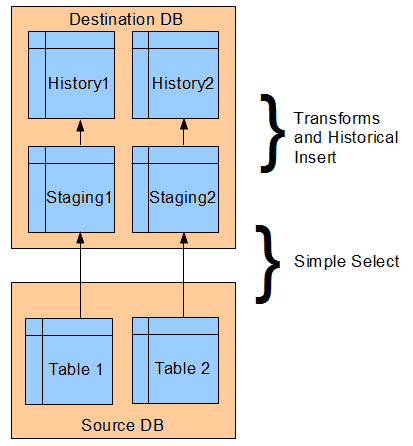
Source to History database diagram
The reason for pulling one to one is simple. First of all, the query is a very simple select. Second, it makes troubleshooting very simple. After importing into staging, the next step is to move the records to the history table(s).
Second Stage – Historical Import
In the historical import, we compare what we have in our history table with what is in staging. Each record in staging is joined with the corresponding current record in the history table on the primary key(s). The checksum of each of the columns is then compared to see if an update has happened to the row. If a row has been updated from the source system, we will need to record this in the history table. In order to do this, we close out the previous record by way of effective dating.
Limiting the Pulls
During the production hours, it’s not a good idea to pull every record from the source system in order to compare to the destination. Therefore, we implement a method of running called an incremental refresh. The incremental refresh simply selects all the records from the table who have a change date greater than the time of the last successful pull. We also employ a full refresh, which can be run at the end of the night, which will allow for a complete comparison of source to destination.
Code
[cc lang=”sql”]
CREATE PROCEDURE [Dba].[Refresh_Table_1]
@RefreshType int = 1,
@DebugMode int = 0
AS
SET NOCOUNT ON
BEGIN
DECLARE @JobID int
DECLARE @DataFlowID int = 1002 — Internal code specific to Refresh_Table_1
DECLARE @LastMaxChangeDate datetime — time the last job ended
DECLARE @MaxChangeDate datetime
DECLARE @RowsStaging int = 0
DECLARE @RowsInserted int = 0
DECLARE @RowsUpdated int = 0
DECLARE @ErrorDesc varchar(max)
DECLARE @ErrorSeverity int
DECLARE @IsSuccess bit = 1
DECLARE @Now datetime = GETDATE()
DECLARE @EffToDate datetime = ‘2079-06-06T00:00:00.000′
INSERT INTO Log.DataImport
(
DataFlowID,
TimeBegin,
RowsInserted,
RowsUpdated,
RowsDeleted,
RefreshType
)
SELECT
@DataFlowID,
TimeBegin = @Now,
NULL,
NULL,
NULL,
@RefreshType
SET @JobID = (SELECT @@IDENTITY)
IF @RefreshType = 1
— Incremental Refresh
BEGIN
SET @LastMaxChangeDate =
(
SELECT LastMaxChangeDate
FROM History.Log.DataImport
WHERE JobID =
(
SELECT MAX(JobID)
FROM History.Log.DataImport
WHERE
DataFlowID = @DataFlowID
AND
IsComplete = 1
AND
IsSuccess = 1
)
)
END
ELSE
— Full Refresh
BEGIN
SET @LastMaxChangeDate = 1
END
— Get the last time we entered data into history
SET @MaxChangeDate =
(
SELECT MAX(DateModified)
FROM SourceDB.Dbo.Employees
)
— Drop current index on staging for fast inserting
IF EXISTS (SELECT * FROM sys.indexes WHERE object_id = OBJECT_ID(N'[Stg].[Table_1]’) AND name = N’IDX_Tmp_Stg_Table_1′)
DROP INDEX [IDX_Tmp_Stg_Table_1] ON [Stg].[Table_1] WITH ( ONLINE = OFF )
TRUNCATE TABLE Stg.Table_1
INSERT INTO Stg.Table_1
(
EmployeeID
,FirstName
,LastName
,Marital_Status
,StartDate
,TerminatedDate
,ManagerID
,Dependents
,EmploymentType
,HasFelony
,FlagRehire
,DateModified
,JobID
,_Chksum
)
SELECT
EmployeeID
,FirstName
,LastName
,Marital_Status
,StartDate
,TerminatedDate
,ManagerID
,Dependents
,EmploymentType
,HasFelony
,FlagRehire
,DateModified
,JobID
,_Chksum =
CHECKSUM
(
FirstName
,LastName
,Marital_Status
,StartDate
,TerminatedDate
,ManagerID
,Dependents
,EmploymentType
,HasFelony
,FlagRehire
)
FROM SourceDB.Dbo.Employees pfh
WHERE pfh.DateModified > @LastMaxChangeDate
AND pfh.DateModified <= @MaxChangeDate
SET @RowsStaging = (SELECT @@ROWCOUNT)
CREATE INDEX IDX_Tmp_Stg_FirstName ON Stg.Table_1 (FirstName,LastName,Marital_Status) INCLUDE(_Chksum)
-- Must be in transaction because we cannot close out
-- without successfully inserting a changed record
BEGIN TRY
BEGIN TRANSACTION
-- Close out records that have changed
UPDATE hpf
SET
_IsCurrentRecord = 0
,_DateLastUpdated = @Now
,_ToDate = spf.DateModified
,_JobID = @JobID
FROM Hst.Table_1 hpf
JOIN Stg.Table_1 spf
ON hpf.EmployeeID = spf.EmployeeID AND
hpf._ChkSum != spf._ChkSum
WHERE hpf._IsCurrentRecord = 1
SET @RowsUpdated = (SELECT @@ROWCOUNT)
-- Insert changed and new records
INSERT INTO Hst.Table_1
(
EmployeeID
,FirstName
,LastName
,Marital_Status
,StartDate
,TerminatedDate
,ManagerID
,Dependents
,EmploymentType
,HasFelony
,FlagRehire
,_FromDate
,_ToDate
,_ProcessInd
,_IsCurrentRecord
,_DateLastUpdated
,_JobID
,_ChkSum
)
SELECT DISTINCT
EmployeeID = spf.EmployeeID
,FirstName = spf.FirstName
,LastName = spf.LastName
,Marital_Status = spf.Marital_Status
,StartDate = spf.StartDate
,TerminatedDate = spf.TerminatedDate
,ManagerID = spf.ManagerID
,Dependents = spf.Dependents
,EmploymentType = spf.EmploymentType
,HasFelony = spf.HasFelony
,FlagRehire = spf.FlagRehire
,_FromDate = spf.DateModified
,_ToDate = @EffToDate
,_ProcessInd = NULL
,_IsCurrentRecord = 1
,_DateLastUpdated = @Now
,_JobID = @JobID
,_ChkSum = spf._ChkSum
FROM Stg.Table_1 spf
WHERE NOT EXISTS(
SELECT 1
FROM Hst.Table_1 hpf
WHERE
hpf.EmployeeID = spf.EmployeeID AND
hpf._FromDate = spf.DateModified
)
SET @RowsInserted = (SELECT @@ROWCOUNT)
COMMIT TRANSACTION
END TRY
BEGIN CATCH
IF @@TRANCOUNT > 0
BEGIN
ROLLBACK TRAN
SELECT @ErrorDesc = ERROR_MESSAGE()
SELECT @ErrorSeverity = ERROR_SEVERITY()
DECLARE @ErrorMessage varchar(55)
SET @IsSuccess = 0
SET @RowsUpdated = 0
SET @RowsInserted = 0
END
END CATCH
UPDATE Log.DataImport
SET
LastMaxChangeDate = @MaxChangeDate,
RowsStaging = @RowsStaging,
RowsInserted = @RowsInserted,
RowsUpdated = @RowsUpdated,
RefreshType = @RefreshType,
IsComplete = 1,
IsSuccess = @IsSuccess,
ElapsedMS = DATEDIFF(ms,@Now,GETDATE())
WHERE JobID = @JobID
— Output Job Statistics
IF @DebugMode = 1
BEGIN
SELECT
JobID = @JobID
,TimeStart = @Now
,TimeEnd = GETDATE()
,ElapsedMS = DATEDIFF(ms,@Now,GETDATE())
,LastMaxChangeDate = @MaxChangeDate
,RowsStaging = @RowsStaging
,RowsInserted = @RowsInserted
,RowsUpdated = @RowsUpdated
,RefreshType = @RefreshType
,IsSuccess = @IsSuccess
,Error = @ErrorSeverity
,ErrorMessage = @ErrorDesc
END
END
[/cc]
- Comments (RSS)
- Trackback
- Permalink

